AppLovin ROAS Campaigns: Why the D7 Target and Realized Revenue Disagree
AppLovin's ROAS campaigns optimize toward a D7 ROAS goal built from the revenue events your MMP forwards. Here's what that number contains, why it diverges from realized cohort revenue, and how to set a target that survives contact with your finance report.
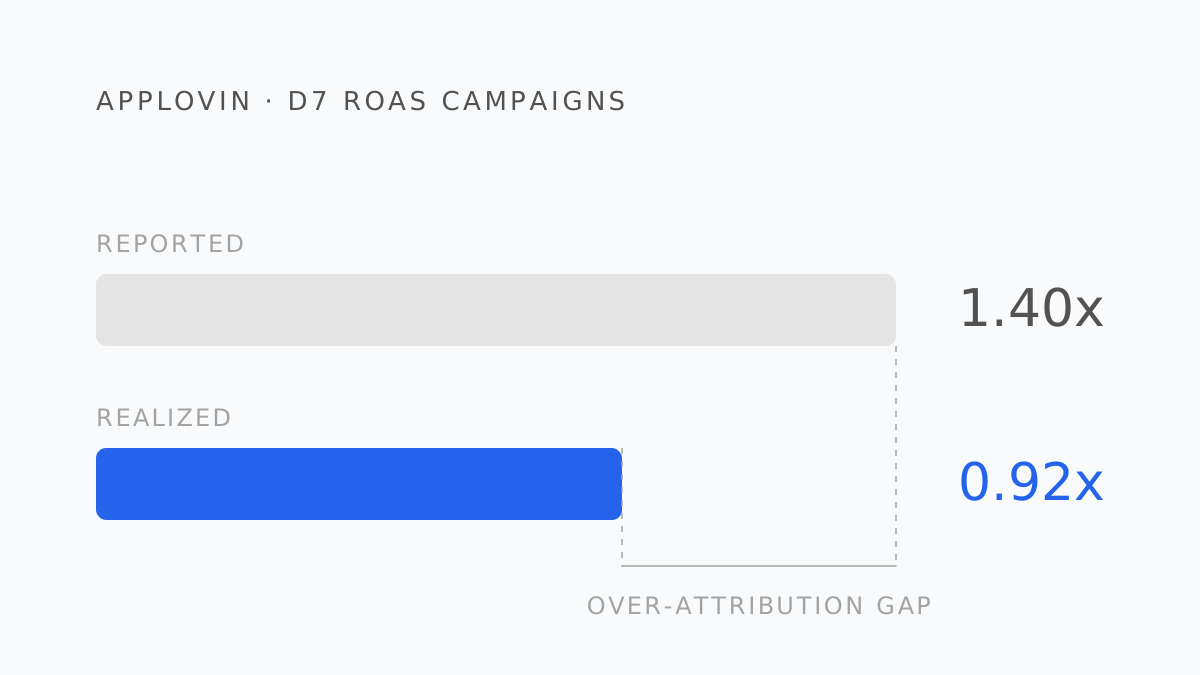
AppLovin's AppDiscovery is, for many game studios, the channel that scales. Its AXON model predicts which users will spend, campaigns can be set to a ROAS goal directly, and the D7 ROAS it reports is often more predictable than what social networks deliver. That reliability is real. It is also easy to mistake for accuracy, and the two are different things.
What an AppLovin ROAS campaign is optimizing
AppDiscovery campaigns can target one of three goals: ROAS, cost per engagement (CPE), or cost per purchase (CPP). A ROAS campaign asks AXON to find users whose predicted revenue, divided by their acquisition cost, clears your target within the optimization window — D7 being the common choice.
To do that, AXON needs to know what users are worth after install. It learns that from the post-install events your MMP (or a server-to-server integration) forwards to AppLovin: purchases with revenue values, subscription events, ad-revenue events if you send them. The reported ROAS is built entirely from those forwarded events divided by spend.
Which means the ROAS in the AppLovin dashboard is only as complete, as timely, and as net as the events you send it.
Four ways it diverges from realized revenue
1. It contains what you forwarded, not what you earned. If your MMP postback configuration sends purchase events but not renewals, D7 ROAS undercounts subscriptions. If it sends event values at gross, ROAS overcounts by the store's commission. If ad revenue isn't forwarded — common for hybrid-monetization games — a large share of real revenue is simply absent. Audit the postback configuration before you audit the campaign.
2. D7 is a prediction window, not a payback window. AXON optimizes toward the D7 goal because seven days is long enough to learn from and short enough to act on. For a mid-core game where whales emerge at D30+, a campaign can hit its D7 target and still not pay back — or miss D7 and pay back handsomely at D90. The D7 figure is the algorithm's feedback signal. Your payback is a different curve.
3. Attribution is whatever your MMP decided. AppLovin reports the installs and events your MMP attributed to it. Last-click across networks means an AppLovin impression followed by a Meta click credits Meta; the reverse credits AppLovin. AppLovin's ROAS rises and falls with your MMP's attribution rules, not only with AppLovin's performance.
4. Postback timing. Revenue events reach AppLovin when the MMP forwards them, which is after the MMP received them, which is after the app reported them. Late events land after the D7 window closes and are not in the D7 figure at all. Realized cohort revenue at D7, read a month later, is routinely higher than the D7 ROAS AppLovin showed at the time.
Setting a D7 target that means something
Work backward from realized data, not forward from a rule of thumb:
- From your subscription or IAP ledger, build the realized revenue curve per install by days since install — proceeds, not gross.
- Find what share of D90 (or your payback horizon) revenue has landed by D7. For many games it's 25–40%.
- Decide your D90 ROAS target from the break-even ROAS plus the margin the business needs.
- Multiply: if you need 1.5x at D90 and 30% of revenue lands by D7, the D7 target is 0.45x — on the same revenue basis you sent AppLovin.
- Check the basis. If you forward gross values, the D7 target on AppLovin's dashboard must be the gross-equivalent of your proceeds target.
Set the target too high and AXON starves the campaign for volume it can't find. Set it from the wrong basis and it scales campaigns that lose money at D90.
The reconciliation
Same shape as Meta and Google: spend by install date from AppLovin, realized proceeds by days since install from the ledger, one day-count across every network. The AppLovin-specific step is the audit of what the MMP forwards — that alone explains most gaps on this channel.
The optimization window most AppLovin ROAS campaigns run on — a feedback signal, not a payback horizon
AppLovin AppDiscovery campaign goals
What to change on Monday
- Audit MMP postbacks to AppLovin: purchase, renewal, refund, ad-revenue events; gross or net values.
- Derive the D7 target from your realized curve and restate it on the basis AppLovin actually receives.
- Add D30 and D90 realized ROAS for AppLovin cohorts next to the D7 dashboard figure. Watch for D7 winners that flatten.
- Never rank AppLovin against other networks on their own ROAS columns. Realized cohort revenue, fixed day, same ledger.
- AppLovin's ROAS is built from the post-install events your MMP forwards, divided by spend — complete only if the postback config is.
- D7 is AXON's optimization window; your payback curve may peak at D30 or D90.
- MMP attribution rules decide what AppLovin gets credit for; its ROAS moves with them.
- Derive the D7 target backward from a realized D90 curve and a break-even bar, on the same revenue basis you send AppLovin.
- Judge the channel on realized cohort revenue at D30 and D90, not on the D7 dashboard alone.
Roasy puts AppLovin's spend next to Adjust's attribution and RevenueCat's realized cohorts at D7, D30, and D90 — so the D7 target and the actual payback stop being two conversations. Next in the series: Unity Ads ROAS campaigns.
Berk Aydın
Performance Marketing Lead at Roasy. Writes about ROAS, retention, and the messy economics of mobile UA.