Google App Campaigns Attribution Window: Why Reported ROAS Runs High
Google App Campaigns default to a 30-day conversion window, count engaged-view and view-through conversions, and model iOS results with up to five days of lag. Here's what that does to the ROAS you see, and how to set the window for tROAS.
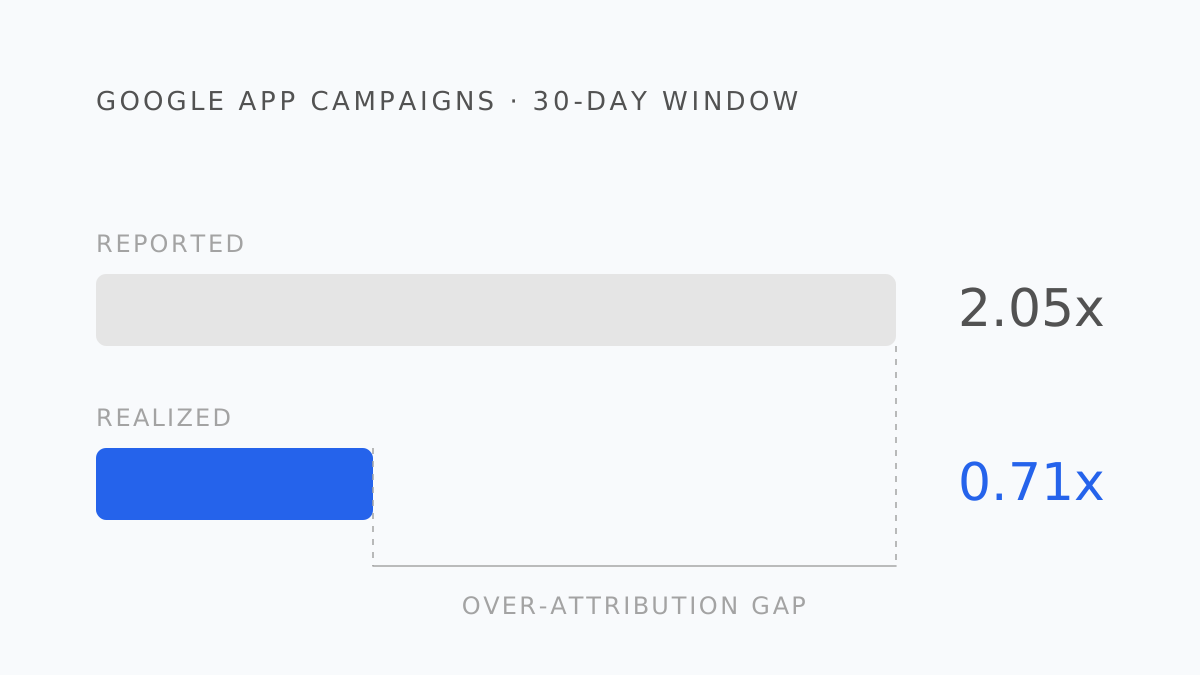
Google App Campaigns (the product formerly called Universal App Campaigns) are the most automated channel most UA teams run: you supply assets and a bid target, Google handles targeting and placement across Search, Play, YouTube, Discover, and Display. That automation extends to measurement, and measurement is where the ROAS in your Google Ads account quietly parts ways with the revenue in your bank.
The window is 30 days by default
When you create a conversion action in Google Ads without customizing it, the click-through conversion window is 30 days. That is more than four times Meta's default 7-day click window, which has two consequences.
First, Google will claim a larger share of conversions that other networks also touched. A subscriber who clicked a Google ad on day 1 and a Meta ad on day 20 before converting on day 22 is inside Google's window and outside Meta's. Google reports it; Meta doesn't. Add the two accounts up and Google appears to be the stronger channel on a basis that has nothing to do with which ad did the work.
Second, a 30-day window delays the moment a campaign's ROAS is final. A campaign that ran in the first week of the month is still accruing attributed conversions at the end of it.
Three more places the number moves
Engaged-view conversions. App Campaigns can count a conversion after a video engagement without a click, within a separate, configurable engaged-view window. On YouTube-heavy campaigns this can be a meaningful share of reported conversions, and it is the share most likely to have happened anyway.
View-through conversions. A third window, for conversions after an impression with no interaction at all. It is configurable and, on app campaigns, worth setting short or off.
Modeled conversions on iOS. Google's documentation states plainly that App Campaign modeled conversions can take up to five days to appear, and — this is the part that surprises people — that App Attribution Partners don't receive attribution claims on modeled conversions. Your MMP therefore sees fewer Google conversions than Google does, by design. The three sources (Google Ads, SKAdNetwork, your MMP) are documented as expected to disagree.
Setting the window for tROAS
For target-ROAS App Campaigns, Google's own guidance is that the conversion window should be long enough to capture around 90% of your in-app revenue events and under 30 days — a balance between giving the model timely feedback and covering the revenue that arrives late.
That guidance is correct and most accounts ignore it, leaving the default 30 days. The practical approach:
- Pull your realized revenue curve by days-since-install from your subscription platform.
- Find the day by which ~90% of D30 revenue has landed. For a 7-day-trial app it's often day 12–16; for no-trial IAP it's often under a week.
- Set the click-through window there. Set engaged-view short. Consider view-through off.
- Re-evaluate after a month of tROAS learning on the new window — the model adjusts to the feedback timing you give it.
A shorter window makes reported ROAS lower and more honest. It does not change what the campaign actually earned, which is why the decision belongs to you and not to the default.
Reconciling Google's ROAS with reality
The join is the same as for every network, and the specifics are what make Google different:
- Spend by install date, from Google Ads. Not by conversion date — the 30-day window means conversion date and install date can be weeks apart.
- Realized proceeds by days since install, from your subscription data. Gross event values sent to Google are not proceeds; the store's cut and refunds are invisible to the platform.
- Same window for every network. D30 realized ROAS for Google against D30 realized ROAS for Meta is a fair comparison. Google's 30-day-window ROAS against Meta's 7-day-window ROAS is not, and it is the comparison most dashboards show.
- Expect Google's over-attribution to be larger. The longer window claims more overlap. The blended ROAS calculator will show it as a bigger share of the gap.
Default click-through conversion window in Google Ads if you don't customize it
Google Ads Help, About conversion windows
What to change on Monday
- Shorten the click window to the ~90% point of your revenue curve if you run tROAS.
- Separate engaged-view and view-through in reports rather than blending them into ROAS.
- Stop comparing Google's ROAS column to other networks' ROAS columns. Compare realized cohort ROAS at a fixed day for all of them.
- Track the MMP-versus-Google gap on iOS as its own line. It is expected, documented, and not a bug in your MMP.
- Google App Campaigns default to a 30-day click window — four times Meta's — so Google claims more overlapping conversions and finalizes later.
- Engaged-view and view-through conversions add credit for ads that were seen, not clicked; both are configurable.
- iOS modeled conversions can take up to five days to appear and are not passed to your MMP, so Google, SKAN, and the MMP are documented to disagree.
- For tROAS, set the window to capture ~90% of revenue events and keep it under 30 days.
- Compare networks on realized cohort ROAS at a fixed day, never on their own ROAS columns.
Roasy does this reconciliation for every connected network, with one window and one revenue definition, so Google's 30-day ROAS and Meta's 7-day ROAS never sit in the same column pretending to be comparable. Previous in this series: why Meta's ROAS doesn't match your revenue. Next: TikTok and SKAN 4's three postback windows.
Berk Aydın
Performance Marketing Lead at Roasy. Writes about ROAS, retention, and the messy economics of mobile UA.