Unity Ads ROAS Campaigns: What the Reported ROAS Is Built On
Unity Ads and ironSource Ads ROAS campaigns need post-install event data delivered through your MMP or a server-to-server link. What arrives there decides the ROAS you see. Here's the data path, the gaps in it, and how to compare Unity fairly with other networks.
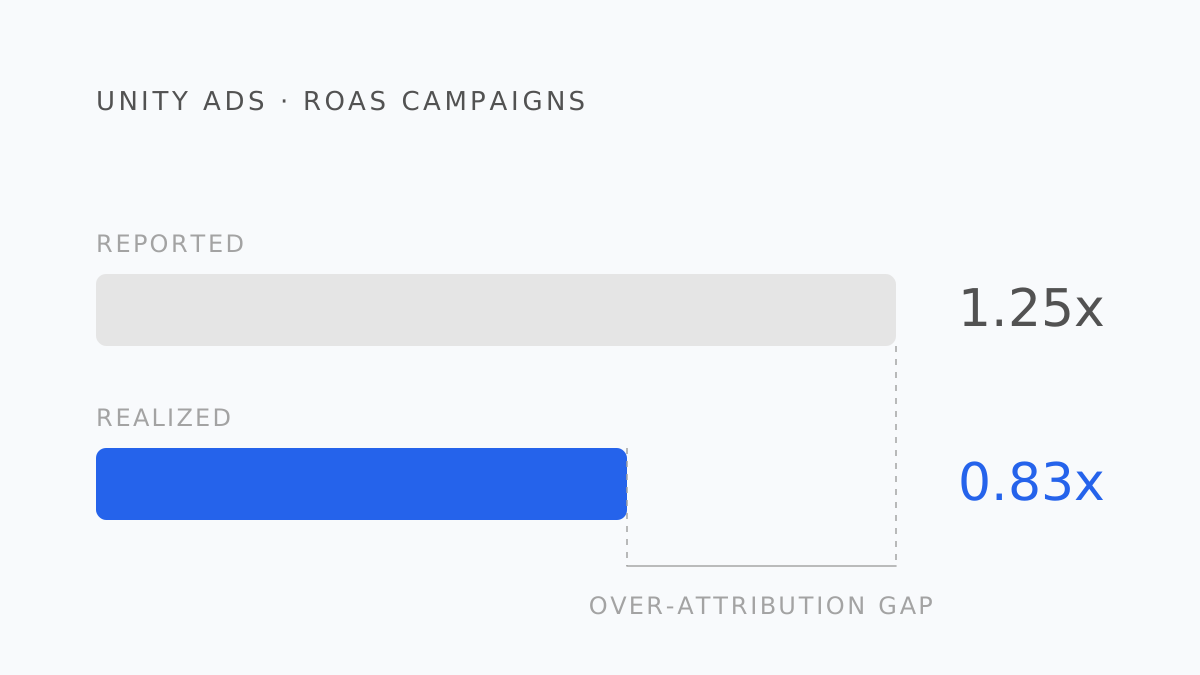
Unity Ads and ironSource Ads — both now under Unity Grow — run install campaigns for games in the inventory that games monetize with. For studios already on LevelPlay mediation, the reporting is right there in the same console, which makes it tempting to read the ROAS column as if it were the ledger. It isn't. It's a view assembled from data you sent, through a path with several places to leak.
The data path
A Unity ROAS campaign needs two things from you:
- Install attribution. Installs are matched to Unity's clicks and impressions through attribution links — either via your MMP, which is the usual route, or through a custom server-to-server integration.
- Post-install events. Campaigns with ROAS or event goals additionally require post-install event data: purchases with values, ad-revenue events, subscription events. These also arrive via the MMP postback or the S2S link.
The reported ROAS is those forwarded event values, for installs the MMP attributed to Unity, divided by spend. Change the postback configuration and the ROAS changes with nothing else moving.
Where it leaks
Missing event types. Hybrid-monetization games earn a large share of revenue from ads inside the game. If ad-revenue events aren't forwarded to Unity, that revenue is invisible to the campaign's ROAS. The campaign then looks worse than it is, the algorithm optimizes toward IAP-only value, and you may pause a channel that was profitable on the total.
Gross values. Forwarded purchase values are typically the list price. The store keeps 15–30%; refunds come later. The dashboard ROAS is on gross unless you deliberately send net.
Attribution rules belong to the MMP. Unity is credited with what the MMP's last-click (or other) rules assign it. A Unity rewarded-video impression followed by a Meta click goes to Meta. Unity's share of your realized revenue is partly a function of attribution settings you configured elsewhere.
Delay. Events reach Unity after the app reports them and the MMP forwards them. Revenue that lands after the optimization window closes is not in the window's ROAS, though it's in your bank.
Self-attributing overlap. Meta, Google, and TikTok are self-attributing networks that claim conversions on their own terms; Unity relies on the MMP's verdict. Sum every network's dashboard and the self-attributing ones will be over-represented relative to Unity — not because Unity performed worse, but because it reported more conservatively. The over-attribution gap is not distributed evenly across channels.
Comparing Unity fairly
The only comparison that puts Unity and the self-attributing networks on the same footing is one that ignores every dashboard's revenue claim:
- Spend by install date, from each network's own reporting — spend is the one number nobody disputes.
- Installs and post-install revenue by acquisition network, from the MMP, applied with one attribution rule to every channel.
- Realized proceeds for those installs, from your subscription or IAP ledger, by days since install.
- One day-count — D30 or D90 — for every channel.
On that basis, Unity's cohorts are measured by the same ledger and the same rules as Meta's. The blended ROAS calculator shows how large the dashboard-sum gap is; the per-channel view is what the cohort join produces.
Setting the ROAS goal
As with AppLovin, derive the goal from the realized curve rather than from the number that feels right:
- Realized revenue per install by days since install, on proceeds, for Unity-acquired cohorts.
- The share of D90 revenue that has landed by the campaign's optimization window.
- The D90 bar from the break-even ROAS calculator plus the margin the studio needs.
- The optimization-window target = D90 bar × share landed — restated on the revenue basis Unity actually receives.
Data feeds a Unity ROAS campaign depends on: install attribution and post-install events, both through your MMP or S2S
Unity Grow campaign requirements
What to change on Monday
- Audit what your MMP forwards to Unity: IAP, ad revenue, subscriptions, refunds; gross or net.
- Put Unity's realized D30 and D90 cohort ROAS next to the dashboard figure.
- Stop ranking channels on dashboard ROAS. Self-attributing networks win that ranking by construction.
- Set the campaign's ROAS goal from the realized curve, on the basis Unity receives.
- Unity's reported ROAS = forwarded post-install event values for MMP-attributed installs ÷ spend; it only contains what you send.
- Ad-revenue events are the most commonly missing input for hybrid-monetization games.
- Unity inherits the MMP's attribution; self-attributing networks don't — so dashboard comparisons favor Meta, Google, and TikTok structurally.
- Compare on realized cohort proceeds, one attribution rule, one day-count.
- Derive the ROAS goal from a realized D90 curve and a break-even bar, restated on Unity's revenue basis.
Roasy reads Unity's spend, Adjust's attribution, and RevenueCat's realized cohorts into one table with one rule for every network, so a conservatively reporting channel isn't penalized for reporting honestly. This closes the series; start from Meta if you came in here, or go straight to the glossary for any term above.
Berk Aydın
Performance Marketing Lead at Roasy. Writes about ROAS, retention, and the messy economics of mobile UA.